Modern sales and marketing teams depend on accurate, actionable data to drive growth. But the infrastructure behind that data, the pipelines that enrich leads, validate contacts, and surface company intelligence at the moment it matters, is often the invisible difference between a team operating at peak efficiency and one drowning in manual research and stale records.
BIGDBM's APIs are designed to close that gap. They give developers and data teams direct, programmatic access to one of the most comprehensive identity and business datasets available, without the complexity of batch file transfers, manual data vendor coordination, or brittle ETL pipelines. Whether you are building a custom CRM enrichment workflow, automating outbound prospecting, or validating contacts before a campaign launch, the API integrates into virtually any stack in a matter of hours.
This guide covers what the APIs do, how to authenticate, the core endpoints, and the patterns that get teams to production fastest.
Why Integrate via API?
Bulk data files have their place, large-scale onboarding, model training, offline enrichment at volume. But for anything that needs to be responsive to real-world events, a new lead entering your CRM, a contact form submission, a sales rep looking up an account in real time, batch processes introduce delays that compound into lost opportunities.
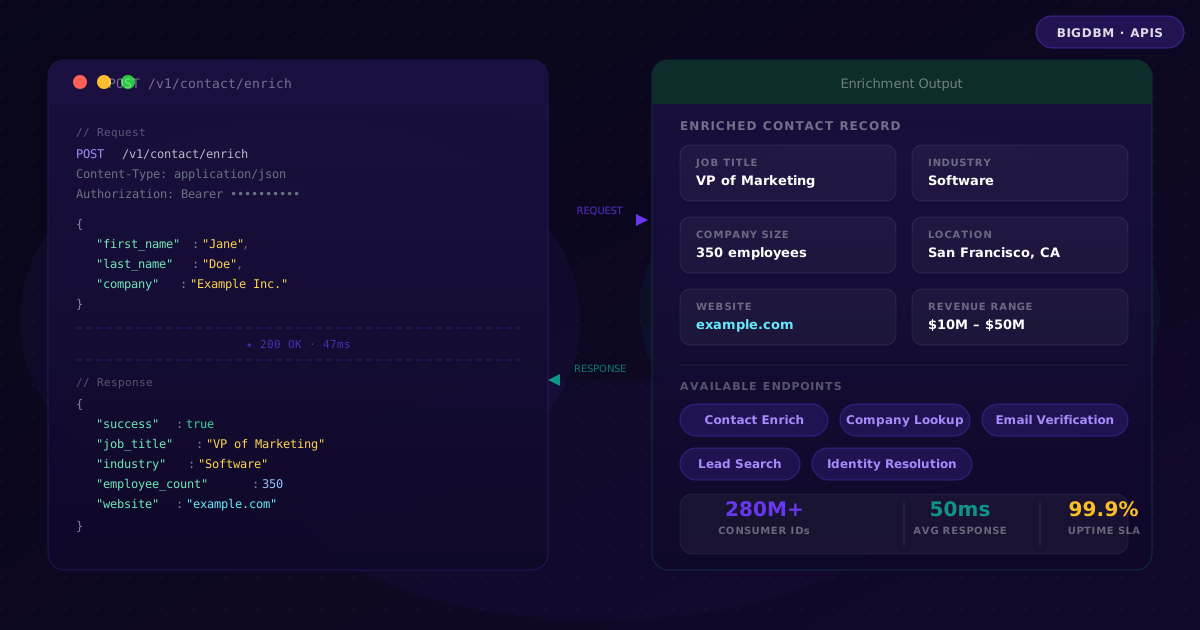
API-first enrichment solves this. A single API call made at the moment a new record is created can return job title, company size, industry, website, and revenue range before the lead ever reaches a sales rep's queue. That context changes how the rep prioritizes, personalizes, and pitches, often before they have even opened the record.
The teams getting the most from data enrichment are not the ones with the largest data budgets, they are the ones who have wired enrichment into the moment of capture, not as a weekly batch job run on stale exports.
Beyond enrichment, programmatic access to company and contact data enables lead scoring, territory assignment, routing logic, and personalization to all run on verified, current data rather than whatever a prospect typed into a form field.
Core Use Cases
Contact Enrichment
Pass a name, email, or phone number and receive professional attributes, job title, seniority, department, company, industry, and location, appended in real time.
Company Lookup
Query by company name or domain and retrieve firmographic data: employee count, revenue range, industry classification, headquarters, and social profiles.
Email Verification
Validate business email addresses before outbound campaigns to reduce bounce rates, protect sender reputation, and improve deliverability across all sending domains.
Lead Generation
Search for net-new prospects by industry, company size, revenue, geography, job title, and department. Build targeted lists without manual research or data broker negotiations.
Making Your First API Call
The contact enrichment endpoint is the most common starting point. It accepts a partial record and returns a fully enriched profile. Here is a minimal request using POST /v1/contact/enrich:
POST /v1/contact/enrich
Content-Type: application/json
Authorization: Bearer YOUR_API_KEY

{
  "first_name": "Jane",
  "last_name": "Doe",
  "company": "Example Inc."
}
{
  "success": true,
  "data": {
    "first_name": "Jane",
    "last_name": "Doe",
    "job_title": "VP of Marketing",
    "company": "Example Inc.",
    "industry": "Software",
    "employee_count": 350,
    "website": "https://example.com"
  }
}
Additional input fields, email address, phone number, LinkedIn URL, improve match confidence and can unlock additional attributes in the response. The more identifiers you provide, the richer the return.
Authentication
All BIGDBM API endpoints use bearer token authentication. Include your API key in the Authorization header of every request:
Authorization: Bearer YOUR_API_KEY
Never expose your API key in client-side JavaScript, public repositories, or application logs. Use environment variables or a secrets manager and rotate keys immediately if they are ever compromised.
API keys are scoped to your account and carry your rate limits and data access permissions. Contact your BIGDBM account manager if you need keys scoped to specific endpoints, higher throughput limits, or separate environments for staging and production.
Error Codes and Handling
BIGDBM APIs return standard HTTP status codes. Build error handling around these codes to make your integration resilient from day one:
| Status Code | Meaning | Recommended Action |
|---|---|---|
| 200 | Request successful | Parse the response and proceed |
| 400 | Invalid request, malformed JSON or missing required fields | Validate input before retrying |
| 401 | Authentication failed, key missing, expired, or incorrect | Check and rotate your API key |
| 404 | Resource not found, no match for the provided input | Log and continue; not all records will match |
| 429 | Rate limit exceeded | Implement exponential backoff and retry |
| 500 | Internal server error | Retry with backoff; contact support if persistent |
A 404 response is not a failure, it simply means the record did not match anything in the dataset. Design your workflow to handle no-match gracefully: log the input, skip enrichment, and continue processing the next record rather than halting the pipeline.
Best Practices for Production Integrations
- Cache selectively. Company-level data, employee count, revenue range, industry, changes slowly. Cache these responses for 30 days. Contact-level data changes more frequently; refresh on a shorter cycle or on trigger events like bounces.
- Validate before you send. Strip leading and trailing whitespace, normalize phone number formats, and confirm email addresses follow standard formatting before including them in a request. Bad input produces bad matches.
- Handle rate limits with backoff. Build exponential backoff into any batch enrichment loop. A 429 response with a
Retry-Afterheader tells you exactly when to retry, respect it. - Secure your credentials. Use environment variables for API keys in all environments. Never commit them to version control or hardcode them in application code.
- Log structured errors. Log the input record, the status code, and a timestamp for every non-200 response. Structured logs make debugging batch failures dramatically faster.
- Version your integrations. Pin to a specific API version in your base URL and review release notes before upgrading. BIGDBM maintains backwards compatibility within a version, but field additions in new versions can affect downstream parsing if you rely on strict schema validation.
Where BigDBM APIs Fit in Your Stack
The endpoints are technology-agnostic RESTful JSON APIs. They work wherever you can make an HTTP request. Common integration points include:
For CRM-connected teams, the most common pattern is a webhook-triggered enrichment on record creation: a new lead hits Salesforce or HubSpot, triggers a webhook to a lightweight middleware function, which calls the BIGDBM enrichment endpoint and writes the returned attributes back to the CRM record, all before the lead has been assigned to a rep.
For data engineering teams, the API slots naturally into a real-time enrichment pipeline alongside identity resolution and scoring. Input records flow in from a message queue, are enriched on the fly, and are written to a downstream data warehouse or CDP with full firmographic context already attached.
For full documentation, endpoint schemas, and interactive examples, visit the BIGDBM API Reference. To generate your API key and explore available data products, start with the BIGDBM Data Market.