Your match rate is one of the most telling numbers in your entire data stack, and most marketing teams never audit it. They accept the percentage their identity vendor reports, assume it's roughly correct, and move on. The problem is that a low match rate silently degrades every downstream campaign: smaller audiences, weaker lookalikes, gaps in suppression, and attribution that misses whole swaths of customer activity.
This guide walks through what match rate actually measures, what good looks like across different use cases, the most common root causes of low rates, and a step-by-step audit process you can run today.
What Match Rate Actually Means
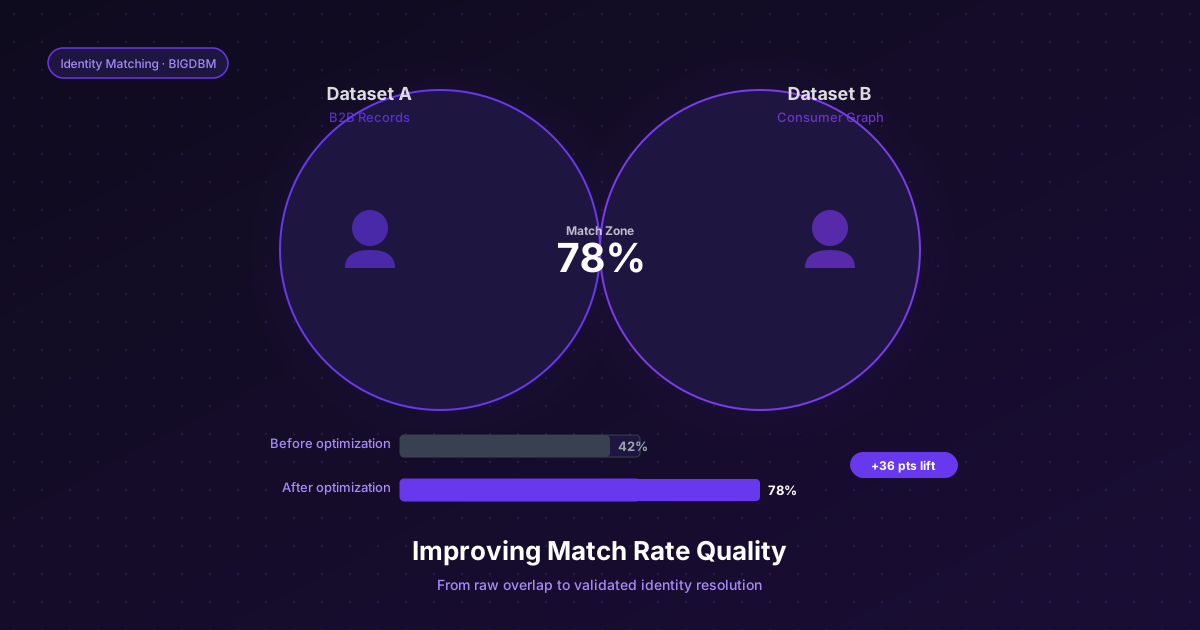
Match rate is the percentage of records in your input file that can be resolved to a known identity in the graph. If you upload 100,000 customer emails and the identity vendor matches 62,000, your match rate is 62%.
But that single number hides important detail. Match rate varies significantly by identifier type, by data vintage, and by the demographic composition of your file. A 62% overall rate might mean 85% on email-to-device matches and 40% on postal-to-phone matches, two very different problems with two very different solutions. Auditing means pulling apart the aggregate and understanding what's happening at each layer.
Equally important is match quality, not just match quantity. A match that links the wrong person is worse than no match at all, it generates false positives in suppression lists, pollutes lookalike seeds, and can create compliance exposure. That's why BIGDBM's Scored Identity Resolution attaches a confidence index (0–100) to every match, so you can apply threshold-based filtering depending on the stakes of the use case.
What Good Match Rates Look Like
The ranges below are illustrative planning examples, not results from a published cross-provider study. Establish targets using a representative sample of your own data:
• Email to device ID: 55–75% is strong; below 40% warrants investigation
• Postal address to phone: 50–70%; lower for older or rural records
• Hashed email (SHA-256) to RampID or UID 2.0: 60–80% on a clean, engaged list
• CRM file onboarding to paid media platforms: 40–60% is typical; above 65% is excellent
If your results fall below your validated baseline, investigate input hygiene, data recency, provider coverage and matching configuration. The audit process below is designed to isolate exactly which factor is dragging your numbers down.
Common Causes of Low Match Rates
Stale data. Email addresses and phone numbers change over time; the rate depends on the population and collection method. A file that hasn't been refreshed in 18 months will show materially worse match rates than one cleansed last quarter. The identifier is valid, it was once correct, but the graph can no longer find a current record attached to it.
Formatting inconsistencies. Emails submitted in mixed case, phone numbers with inconsistent country code prefixes, postal addresses without standardized abbreviations, all of these create matching failures that have nothing to do with actual coverage gaps. They're parsing failures, not identity failures.
Role accounts and shared inboxes. B2C files often contain a higher proportion of role-based emails (info@, admin@, noreply@) than you'd expect, especially if your data collection happens at checkout where people sometimes provide a shared business address. These will never match to a consumer identity profile.
Thin demographic segments. Match rates are lower for certain populations, younger consumers who are more protective of their contact information, rural households with fewer digital touchpoints, and very high-income segments that have opted out of more data collection channels. If your customer file is concentrated in these demographics, your aggregate rate will reflect that composition.
Wrong identifier type for the use case. Trying to match a list of MD5-hashed emails to a graph that's indexed on SHA-256 will produce near-zero results. Confirm the exact hash format your graph accepts before diagnosing a coverage problem.
A Step-by-Step Match Rate Audit
Step 1: Segment your file before submission. Don't submit your entire CRM as a single batch. Break it into cohorts by data source (web opt-in vs. purchase vs. loyalty), by age of record (acquired in the last 6 months vs. 6–24 months vs. older), and by identifier type (email only, phone only, email + postal). Submit each cohort separately so you get match rates by segment, not just an aggregate.
Step 2: Standardize formatting before submission. Run your file through a basic normalization pass: lowercase all emails, strip whitespace, standardize phone format to 10-digit US with no country code, apply USPS CASS address certification if you have postal data. This step alone typically improves match rates by 3–8 percentage points.
Step 3: Remove known-invalid records. Filter out role-based emails, unsubscribed records with high bounce history, and any records flagged as fraudulent in your own systems. These records inflate your denominator without contributing to the numerator.
Step 4: Review the confidence score distribution, not just the match count. When using a scored identity system like BIGDBM's, look at what percentage of your matches fall above 80, between 60–80, and below 60. A file where 70% of matches cluster below 60 is effectively low-quality, even if the headline match rate looks adequate.
Step 5: Compare against a control set. Take a subset of records where you have ground truth, customers who have transacted with you multiple times across channels and whose identity you can verify, and measure match rate on that subset specifically. If your known-good segment matches poorly, the issue is likely on the graph side. If your known-good segment matches well but the broader file doesn't, the issue is data quality in the broader file.
When Scored Resolution Changes the Equation
The traditional approach to low match rates is to cast a wider net, lower the threshold, accept more probabilistic matches, and accept the precision tradeoff. But that approach conflates quantity with usability. A high-volume, low-confidence match set will perform worse on suppression (you'll message people you should have excluded) and worse on lookalikes (you're seeding the model with questionable records).
Scored identity resolution inverts this logic. Instead of a binary accept/reject threshold, you tune the confidence floor per use case. For audience suppression, where a false positive means contacting someone who opted out, you want only high-confidence matches (85+). For broad prospecting, you can open the threshold to 65+ to maximize reach without sacrificing the ability to audit. BIGDBM's Scored Identity Resolution is built exactly for this kind of threshold-based workflow, giving your team full visibility into confidence distribution so you can make informed tradeoffs rather than accepting a black-box match rate number.
The bottom line: match rates are diagnostic, not fixed. Most low-rate situations are recoverable through data hygiene, formatting standardization, and smarter segmentation, before you ever need to evaluate a new identity vendor.